In 2026, a WordPress website is no longer just a digital business card; it’s a high-performance engine that powers your brand’s authority, revenue, and security. However, as the platform has evolved to power nearly half of the internet, the threats have become more sophisticated, and user patience has hit an all-time low.
If your site takes more than two seconds to load, or if you’re still using a “password” instead of a passkey, you’re not just lagging—you’re a target. This guide breaks down the essential 2026 maintenance checklist to keep your site at the top of the SERPs and safe from the latest digital threats.
Performance Optimization in the Age of Instant Gratification
Speed in 2026 is measured by Interactivity. With Google’s refined focus on Interaction to Next Paint (INP), it’s not just about how fast your page appears, but how quickly it responds when a user clicks a button.
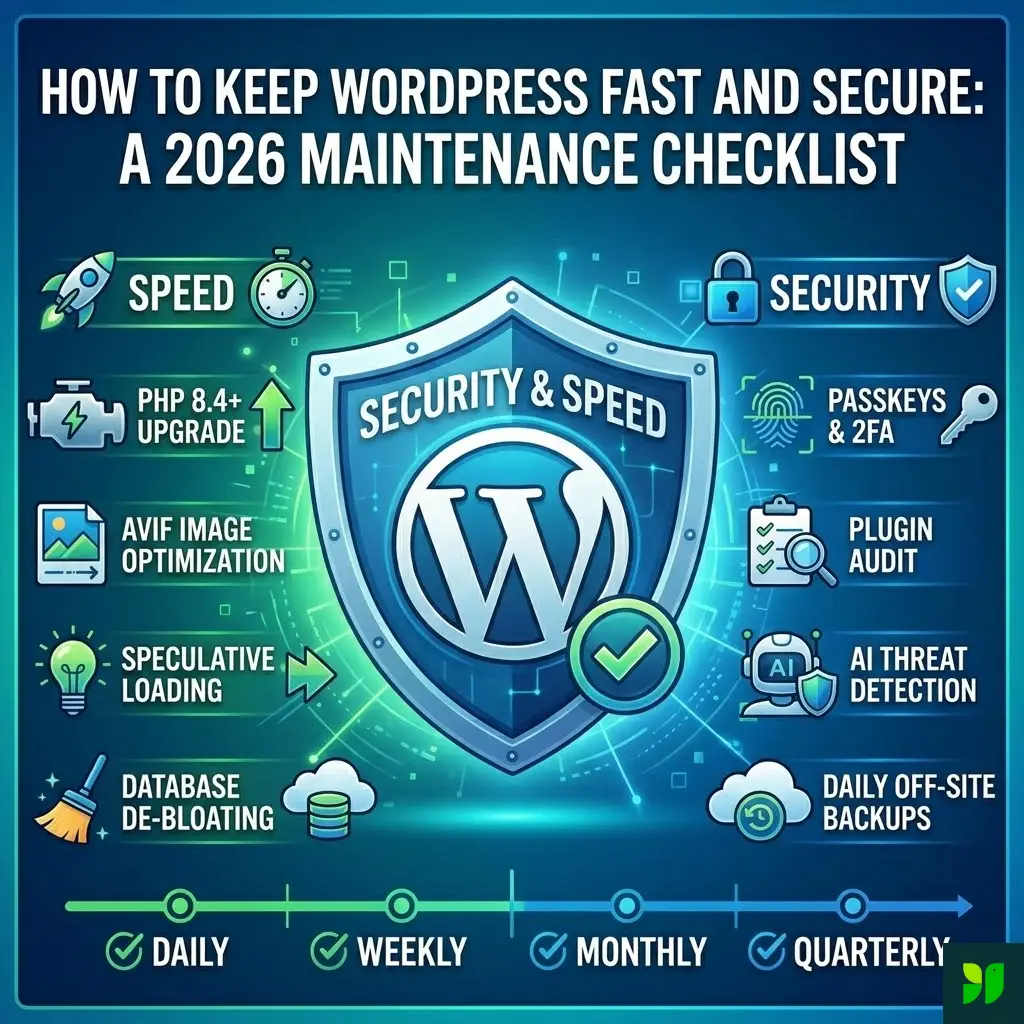
1. The PHP 8.4+ Transition
PHP is the engine under your WordPress hood. In 2026, running on PHP 7.x or even early 8.x is like trying to win a Formula 1 race in a minivan. Upgrading to PHP 8.4 (or the latest stable version) provides a massive boost in execution speed and reduces server resource consumption by up to 30%.
Why it matters: Older PHP versions are no longer receiving security patches.
Action Step: Check your “Site Health” tool in the dashboard. If you aren’t on the latest version, contact your host. Most managed WordPress hosts now offer a one-click PHP switcher.
2. Implement Speculative Loading
This is the “secret sauce” of 2026. Speculative loading uses the Speculation Rules API to predict which page a user will click next and begins pre-rendering it in the background.
The Result: When the user clicks, the page loads instantly—zero latency.
How to do it: Use a modern performance plugin (like WP Rocket or FlyingPress) that supports speculation rules. This moves your site from “fast” to “perceived instant.”
3. Media Evolution: Moving Beyond WebP to AVIF
While WebP was the gold standard a few years ago, AVIF is the king of 2026. AVIF offers even better compression than WebP without losing detail, specifically in high-resolution photography.
Maintenance Task: Use an image optimization plugin that supports auto-conversion to AVIF.
Pro Tip: Ensure you are using “Lazy Loading” for everything below the fold, but exclude your Hero image (the Largest Contentful Paint or LCP element) to ensure it’s visible the moment the page begins to render.
4. Database De-bloating and Object Caching
Every time you save a post, WordPress stores a revision. Over a year, thousands of revisions, expired transients, and spam comments can clog your database, slowing down every query.
Persistent Object Caching: Ensure your host uses Redis or Memcached. This stores database query results in the server’s RAM so the database doesn’t have to work as hard for repeat requests.
The Task: Weekly, use an optimization tool to limit post revisions to 3 and clear out “orphaned” metadata.
Ironclad Security for 2026
Security has shifted from “firewalls” to “identity and behavior.” In an era of AI-driven brute force attacks, a simple password is no longer enough.
5. The Death of the Password: Passkeys and Biometrics
Passwords are a 20th-century solution to a 21st-century problem. In 2026, your maintenance routine must include moving toward Passwordless Authentication.
Passkeys: These allow you to log into your WordPress admin using FaceID, TouchID, or a physical security key (like a YubiKey). They are phishing-resistant.
Mandatory 2FA: If you aren’t using Two-Factor Authentication for every admin account, you are effectively leaving the door unlocked. Use an app-based authenticator rather than SMS, which is vulnerable to SIM-swapping.
6. The “Zero Trust” Plugin Audit
Plugins account for roughly 96% of all WordPress vulnerabilities. In 2026, “Set and Forget” is a recipe for a $5,000 cleanup bill.
The “Six-Month” Rule: If a plugin hasn’t been updated by its developer in 6 months, it’s a liability. It may not be compatible with the latest WordPress core or PHP version.
The Task: Every two weeks, audit your list. Delete (don’t just deactivate) anything you aren’t using. Every line of inactive code is a potential “backdoor” for a hacker.
7. AI-Powered Threat Detection
Standard firewalls look for known “bad” code. Modern AI security tools look for anomalous behavior.
Behavioral Blocking: If a user from a location you don’t serve suddenly tries to access your
/wp-admin50 times in a minute, AI blocks them before they even hit the login screen.Task: Ensure your security plugin (like Wordfence or Sucuri) has its “Learning Mode” or AI-heuristics enabled. This allows the firewall to “learn” what normal traffic looks like for your specific site.
The 2026 Maintenance Checklist
To keep your site running like a well-oiled machine, follow this schedule. Consistency is the difference between a thriving site and a broken one.
Daily Tasks
Automated Off-site Backups: Ensure your backups are stored away from your web server (e.g., AWS S3, Dropbox, or Google Drive). If your server burns down, your backup should be safe elsewhere.
Security Logs: Quickly scan for failed login attempts or unauthorized file changes.
Weekly Tasks
Core, Theme, and Plugin Updates: Never update on a Friday! Do your updates early in the week so you are around if something breaks.
Broken Link Check: Use a tool to find 404 errors. Broken links frustrate users and signal to Google that your site is unmaintained.
Comment Moderation: Clear out the spam queue to keep your database light.
Monthly Tasks
Performance Audit: Run a Google PageSpeed Insights report. Compare it to last month. Did a new plugin tank your mobile score?
Visual Regression Testing: Check your site on different browsers (Chrome, Safari, Firefox) and devices. Sometimes a small CSS update can break your mobile menu without you noticing.
Database Cleanup: Optimize tables and remove expired transients.
Quarterly Tasks
User Audit: Review who has “Admin” access. Remove old employee accounts, former contractors, or “test” users.
Form Testing: Actually fill out your contact forms and checkout process. You’d be surprised how often a plugin update breaks the very thing that makes you money.
SEO and Human Experience (UX)
Search engines in 2026 are smart. They don’t just look for keywords; they look for Site Health and Authority.
Accessibility as an SEO Factor
In 2026, WCAG 2.2 compliance isn’t just a legal requirement for many—it’s an SEO signal. Google rewards sites that are inclusive.
Maintenance: Check for color contrast, ensure all images have descriptive Alt-text, and verify that your site is fully navigable via keyboard.
Uptime Monitoring
If your site goes down for 30 minutes, you don’t just lose sales; you lose “trust signals” with search engine crawlers. Use a service like UptimeRobot or Better Uptime to get an immediate SMS if your site goes offline.
Content Pruning
Part of maintenance is keeping your content fresh.
Action: Find posts that haven’t received traffic in over a year. Either update them with 2026 data, merge them into a larger “Ultimate Guide,” or delete them and 301-redirect the URL to a relevant page.
Hosting – The Foundation of Everything
You can optimize your WordPress site all day, but if you are on $3/month “unlimited” shared hosting, you will hit a ceiling.
By 2026, Edge Computing and Serverless WordPress components are becoming mainstream. If your host isn’t offering a robust Content Delivery Network (CDN) with “Edge Caching” (like Cloudflare APO or Quic.cloud), you are leaving speed on the table.
A Peer’s Perspective: I see many site owners hit “Update All” and hope for the best. Don’t be that person. Always run updates on a Staging Site first. Most quality hosts in 2026 offer a one-click staging environment. Test it there, then push to live. It takes five extra minutes but saves hours of “white screen of death” panic.
Summary: Your 2026 Success Formula
To stay competitive, your WordPress maintenance strategy should be proactive, not reactive.
| Priority | Feature | 2026 Standard |
| Speed | Engine | PHP 8.4 + Redis |
| Speed | Images | AVIF + Speculative Loading |
| Security | Login | Passkeys (Passwordless) |
| Security | Firewall | AI-driven Behavioral Analysis |
| UX | Accessibility | WCAG 2.2 Compliance |
Final Thought
The cost of neglect is high. In 2026, the average cost to recover a hacked WordPress site—including lost revenue, developer fees, and SEO damage—exceeds $3,500. Compare that to the 15–30 minutes a week it takes to follow this checklist, and the ROI of maintenance is astronomical.
Your website is an asset. Treat it like one. Keep it fast, keep it secure, and it will keep working for you.