In the fast-evolving digital landscape of 2026, the question of WordPress security has shifted from “How do I stay safe?” to “How do I stay resilient?” For over two decades, WordPress has remained the world’s most popular Content Management System (CMS), now powering nearly half of the internet. But with great popularity comes a relentless, automated target on its back.
One of the oldest tricks in the book is Limiting Login Attempts. In the early 2010s, this was a revolutionary plugin concept. By 2020, it was a standard recommendation. Now, in 2026, some critics argue that with the rise of Passkeys, Biometrics, and Cloudflare-level edge protection, simple login limits are “old school.”
They couldn’t be more wrong.
In this exhaustive guide, we will explore why limiting login attempts remains a non-negotiable pillar of WordPress security in 2026, how the threat landscape has changed, and how to build a “Zero Trust” login environment that keeps your data safe without ruining the user experience.
The Anatomy of a 2026 Brute Force Attack
To understand why we still need to limit login attempts, we have to look at how hackers have leveled up. Gone are the days of a “script kiddie” running a basic Python script from a single laptop.
The Rise of Distributed AI Brute Forcing
In 2026, attackers use Generative Adversarial Networks (GANs) to predict password patterns. If an attacker knows your dog’s name and your birth year (scraped from social media), an AI can generate 50,000 variations of that password in seconds.
Furthermore, these attacks are distributed. Instead of 1,000 attempts from one IP address, the attack comes from 1,000 different “zombie” IoT devices (smart fridges, cameras, etc.) across the globe, each making only one or two attempts. This is designed specifically to bypass simple IP-based blocking.
Credential Stuffing: The Silent Killer
We’ve seen massive data breaches in the mid-2020s. Hackers now take the billions of leaked emails and passwords from other sites and “stuff” them into WordPress login forms. Because humans are creatures of habit, they often use the same password for their bank as they do for their WordPress blog. Without a mechanism to shut the door after five failed “stuffed” credentials, a bot will eventually find the key that fits.
Why “Limiting Attempts” is About More Than Just Passwords
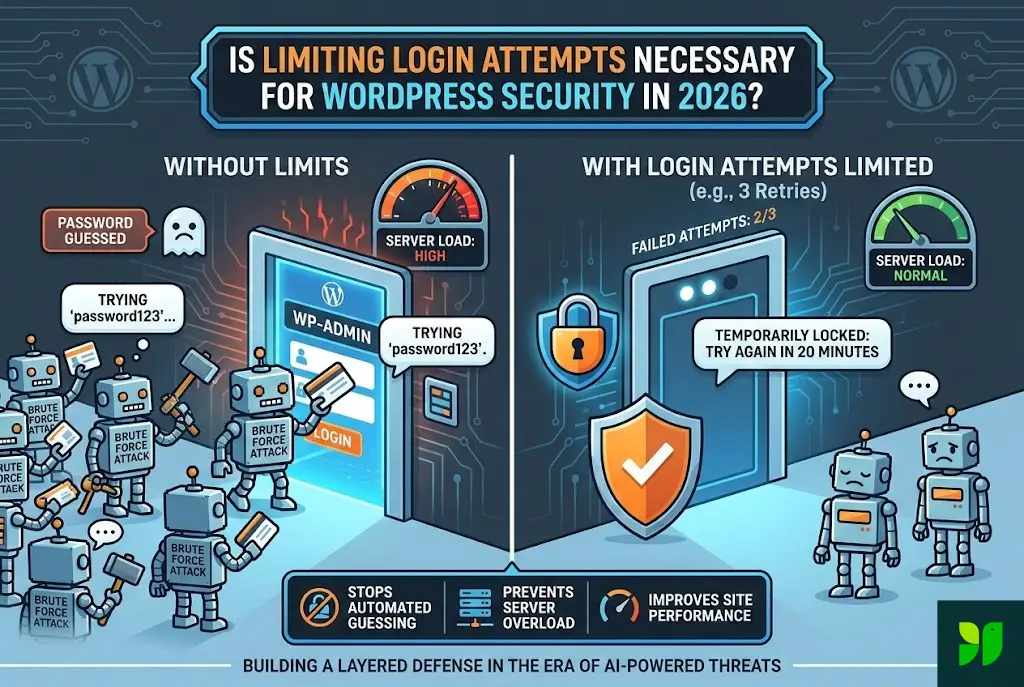
A common misconception is that if you have a “strong” password, you don’t need to limit attempts. In 2026, this logic is dangerously flawed for two reasons: Server Resource Exhaustion and Metadata Leakage.
The “Hidden” Denial of Service (DoS)
Every time a login attempt is made, WordPress has to work. It must:
Initiate a PHP process.
Query the MySQL/MariaDB database to find the user.
Use a CPU-intensive hashing algorithm (like Argon2 or bcrypt) to compare the entered password with the one stored in the database.
If a bot swarm hits your /wp-login.php page 100 times per second, your server’s CPU usage will spike to 100%. Even if the bot never gets in, your website becomes sluggish or crashes for your actual customers. Limiting login attempts acts as a “circuit breaker,” preserving your server’s health.
Preventing Username Enumeration
Many login limiters also hide whether a “failed” attempt was due to a wrong username or a wrong password. By default, WordPress tells you: “The password you entered for the username ‘admin’ is incorrect.” This confirms to the hacker that ‘admin’ exists. A modern 2026 security setup stops this confirmation after two tries, leaving the hacker in the dark.
The 2026 Security Stack: Where Login Limits Fit In
In 2026, we follow the Layered Defense Model. No single tool is a “silver bullet.” Think of your WordPress site like a high-security vault:
Layer 1: The Perimeter (DNS/WAF). Services like Cloudflare or Sucuri block known malicious IPs before they even reach your server.
Layer 2: The Door Guard (Limiting Login Attempts). This stops the bots that made it through the perimeter.
Layer 3: The Identity Check (2FA/Passkeys). Even if they guess the password, they can’t get past the biometric or hardware key.
Layer 4: The Internal Alarm (Audit Logs). If someone does get in, you have a record of exactly what they touched.
Is 2FA Enough?
You might ask, “If I have Two-Factor Authentication, why do I care if someone guesses my password 5,000 times?”
The answer is Account Lockout. In many 2026 configurations, if an attacker gets the password right but fails the 2FA, the account is still “semi-compromised.” By limiting the initial login attempts, you prevent the attacker from ever reaching the 2FA screen, keeping your first layer of defense intact.
How to Implement Advanced Login Security in 2026
If you are convinced that limiting attempts is necessary (and you should be), how do you do it correctly without locking yourself out?
Step 1: Intelligent Lockout Thresholds
Don’t be too aggressive. Setting a 1-attempt limit is a recipe for disaster when you have a typo on your mobile phone.
Standard Rule: 3-5 retries allowed within 5 minutes.
Progressive Penalty: 1st lockout = 20 minutes. 2nd lockout = 24 hours.
The “Blacklist” Trigger: If an IP is locked out 3 times in a week, ban it permanently at the firewall level.
Step 2: Move the Goalposts (Custom Login URL)
By default, every bot knows to look at yoursite.com/wp-login.php. In 2026, obscuring this URL is a simple but effective “security through obscurity” tactic. Change it to yoursite.com/enter-the-vault. This significantly reduces the volume of brute-force traffic your login limiter has to handle.
Step 3: Use “Cloud-Sync” Blocklists
In 2026, the best plugins (like Wordfence or Limit Login Attempts Reloaded) use a Global Intelligence Network. If a specific IP address is caught trying to brute-force a site in Australia, that IP is automatically blocked on your site in London before it even tries to log in. This “herd immunity” is the most powerful weapon we have against modern botnets.
The User Experience (UX) Conflict
The biggest argument against limiting login attempts is that it frustrates real users. We’ve all been there: you forget your password, get locked out, and now you have to wait 20 minutes to finish your work.
How to Fix UX in 2026:
Whitelisting: Ensure your home and office IP addresses are whitelisted so you can never lock yourself out.
Graceful Recovery: Instead of a “Banned” screen, show a “Request an Unlocked Link” button that sends an email to the user’s verified address.
Passkey Integration: Encourage users to use Passkeys. Since there is no password to “guess” and the authentication is handled by the device (FaceID/TouchID), the “Login Attempt” limit is never triggered for legitimate users.
The Verdict: Necessity vs. Nostalgia
Some developers claim that in the era of “Headless WordPress” and specialized hosting (like WP Engine or Kinsta), these plugins are redundant. While it’s true that high-end hosting provides some protection, relying solely on your host is a gamble.
Hosting-level security is often “broad.” They look for massive spikes. A slow, methodical, AI-powered brute force attack that tries one password every 10 minutes might fly under their radar. A dedicated Limit Login Attempts configuration is “narrow”—it cares specifically about your site’s integrity.
Summary Checklist for 2026:
Install a dedicated login limiter (or ensure your security suite has it active).
Enable 2FA as a secondary requirement.
Use a WAF to block bad traffic at the edge.
Monitor your logs once a month to see where attacks are coming from.
Educate your team on password hygiene (or move to Passkeys).
Final Thoughts
As we look toward the remainder of 2026 and into 2027, the “front door” of your WordPress site remains its most vulnerable point. Security is not a product you buy; it is a process you maintain.
Limiting login attempts is the digital equivalent of a sturdy deadbolt. It doesn’t make your house “un-hackable,” but it makes it a much less attractive target than the neighbor who left their door wide open. In the age of AI-driven cybercrime, being a “hard target” is often the best defense you have.
Stop the bots. Save your server resources. Protect your peace of mind.