For over two decades, the “local development stack” has been a rite of passage for every WordPress developer. Whether it was the early days of wrestling with MAMP or XAMPP, or the modern, slick interfaces of LocalWP and DevKinsta, the workflow remained identical: you download a heavy server stack, install it on your hardware, manage a local database, and troubleshoot port conflicts.
But as we navigate through 2026, a new contender has emerged that challenges this entire philosophy: WordPress Playground.
Running a full WordPress instance entirely inside a web browser—no server, no installation, and zero configuration—sounds like magic. But is it just a shiny toy for testing plugins, or is it truly the “LocalWP killer”? In this guide, we’ll break down the tech, the pros, the cons, and the future of how we build for the web.
What is WordPress Playground? The Technical Sorcery
To understand if Playground can replace local development, we first have to understand what it actually is. Traditionally, WordPress requires a “LAMP” or “LEMP” stack: Linux, Apache/Nginx, MySQL, and PHP. These components usually live on a server or a virtual machine on your computer.
WordPress Playground flips the script by using WebAssembly (WASM).
How the Magic Works:
PHP in the Browser: Using WASM, the developers have compiled the entire PHP interpreter into a format that a web browser (like Chrome or Firefox) can execute. Your browser is no longer just a viewer; it is the server.
The SQLite Bridge: Browsers cannot natively run MySQL. To solve this, Playground uses a specialized translation layer that allows WordPress to use SQLite. This means all your posts, pages, and settings are stored in a single file within the browser’s temporary memory.
Virtual File System: When you upload a plugin in Playground, it isn’t saving to your hard drive in the traditional sense. It’s saving to a virtualized file system managed by JavaScript.
In short, it’s a “Disposible WordPress” that lives and dies with your browser tab.
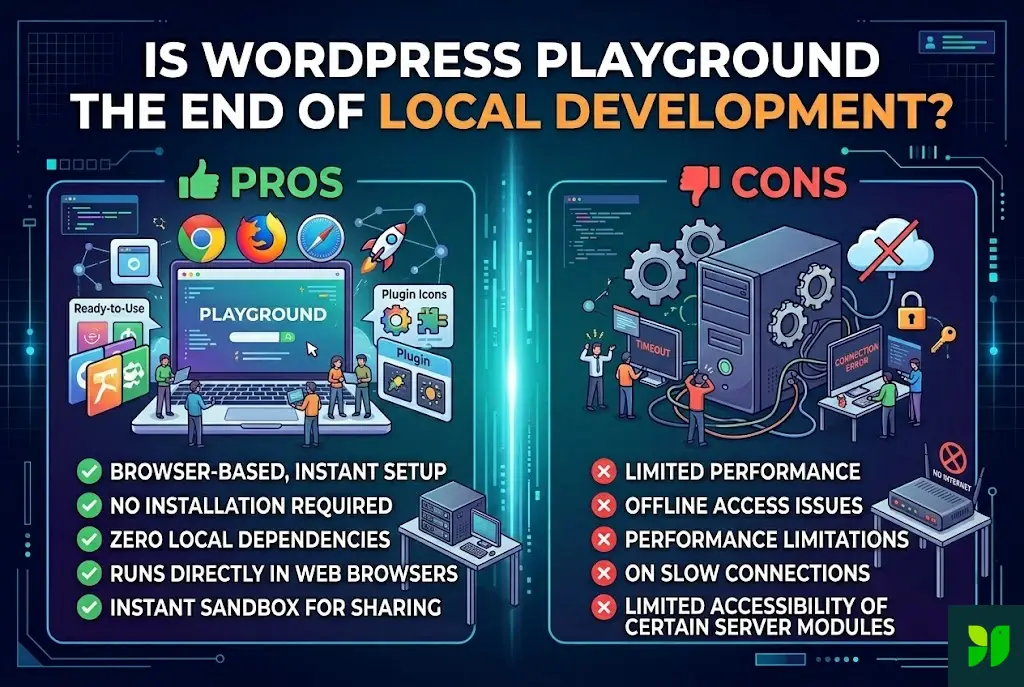
The Pros: Why Playground is Revolutionary
If you’ve ever spent four hours trying to fix a “Error Establishing a Database Connection” on a local install, you already know why Playground is appealing. Here are the primary advantages:
A. Zero Friction and Instant Gratification
The biggest barrier for new developers—or even veterans trying a quick experiment—is setup time. With Playground, you visit playground.wordpress.net and you are in the admin dashboard in under five seconds. There is no downloading 500MB of software, no granting “Admin Privileges” to an installer, and no worrying about whether your version of macOS is compatible with a specific version of PHP.
B. Disposable “Blueprints”
Playground introduced a concept called Blueprints. These are JSON files that act as a “recipe.” You can share a link that automatically:
Launches a specific version of WordPress.
Installs a specific theme (like Astra or GeneratePress).
Activates a set of plugins.
Populates the site with dummy content.
This is a game-changer for plugin and theme developers. Instead of telling a potential customer to “Download and install my demo,” you just give them a link to a live, interactive sandbox.
C. Total Isolation and Security
Because Playground runs in a “sandbox” within the browser, it has no access to your computer’s actual file system (unless you explicitly grant it). You can test “shady” plugins, experimental code snippets, or radical database changes without any risk of breaking your computer or affecting your other local projects. If things go wrong, you simply close the tab.
D. Offline Capabilities
Thanks to Service Workers, once the initial Playground environment is loaded, you can actually continue working on your site without an internet connection. This makes it a powerful tool for developers who travel or work in areas with spotty Wi-Fi.
The Cons: The Growing Pains of Browser-Based Dev
If Playground is so great, why hasn’t everyone deleted LocalWP yet? Because the browser environment has some inherent, physical limitations.
A. Persistence is a Major Headache
The most significant “con” of Playground is that it is ephemeral. By default, if you refresh the page or close the browser tab, your work is wiped out. While the team has introduced “Browser Storage” persistence and “Sync to GitHub” features, they are not as seamless as having a folder on your Desktop that stays there forever.
B. The Storage and Memory Ceiling
Web browsers are designed to be efficient, not to be heavy-duty servers. Browsers impose strict limits on how much data a single tab can store (often limited by the available disk space or specific browser caps like 250MB). If you are building a site with a massive library of 4K images or a WooCommerce store with 5,000 products, Playground will likely crash.
C. Compatibility Issues (The SQLite Factor)
While the SQLite integration is brilliant, it isn’t 100% perfect. Some plugins that rely on complex, custom MySQL queries may fail or behave unpredictably. For a developer, the goal of “Local Development” is to mimic the “Production Environment” as closely as possible. Since 99% of web hosts use MySQL/MariaDB, developing on SQLite adds a layer of risk when it comes time to go live.
D. Networking Limitations
Because Playground lives in a browser, it cannot easily make “Outbound” requests. For example, if you are testing a plugin that needs to connect to an external API or fetch data from a remote server, you might run into CORS (Cross-Origin Resource Sharing) errors. A traditional local server doesn’t have these “browser-security” shackles.
Head-to-Head: Playground vs. Traditional Local Tools
| Feature | WordPress Playground | LocalWP / DevKinsta |
| Setup Time | < 10 Seconds | 5 – 10 Minutes |
| System Impact | Negligible (One tab) | High (Virtual Machines/Containers) |
| Database | SQLite (Emulated) | MySQL / MariaDB (Native) |
| Primary Use Case | Testing, Demos, Learning | Building full sites, Long-term dev |
| File Access | Virtual (In-browser) | Direct (HDD/SSD) |
| Collaboration | Shareable URLs | Local only (unless using Live Links) |
Is This the End of Local Development?
To answer the titular question: No, but the definition of “Local Development” is changing.
We are entering a “Hybrid Era.” We are already seeing this with tools like Studio by WordPress.com. Studio uses the Playground engine (WASM) but wraps it in a desktop application. This gives you the speed of Playground with the persistence of a traditional local app.
Who should switch to Playground now?
Educators: Teaching a WordPress class? Don’t spend the first hour helping students install XAMPP. Give them a Playground link.
QA Testers: Need to see if a plugin update breaks a site? Pop it into Playground first.
Sales Teams: Want to show a client a “mockup” of their site? Send them a Blueprint link.
Who should stay with LocalWP/DevKinsta?
Full-Stack Developers: If you are writing custom database queries or need to use tools like XDebug and WP-CLI in a native terminal.
E-commerce Builders: If you are managing large databases and heavy media libraries.
Performance Specialists: If you need to test server-side caching (Redis/Varnish) before deployment.
How to Use WordPress Playground Like a Pro
If you want to start using Playground for more than just a 5-minute toy, you need to master Blueprints. Here is a quick example of a JSON Blueprint that sets up a “SEO-Ready” environment:
JSON
{
    "landingPage": "/wp-admin/",
    "steps": [
        {
            "step": "installPlugin",
            "pluginZipFile": {
                "resource": "wordpress.org/plugins",
                "slug": "wordpress-seo"
            }
        },
        {
            "step": "installTheme",
            "themeZipFile": {
                "resource": "wordpress.org/themes",
                "slug": "astra"
            }
        }
    ]
}
By hosting this JSON file on GitHub, you can create a link that anyone can click to launch a pre-configured WordPress site. This is the future of collaborative development.
The Road Ahead: What’s Next for 2026?
The WordPress core team is heavily invested in Playground. We are already seeing “inter-browser” communication, allowing you to move a site from Chrome to Firefox seamlessly. The next big hurdle is Multisite support and native MySQL support via WASM, which would eliminate the SQLite compatibility issues.
Once those two pillars are in place, the argument for keeping a heavy, resource-draining server stack on your laptop becomes much harder to make.
Conclusion: The New Normal
WordPress Playground hasn’t killed local development; it has liberated it. It has taken the power of a WordPress server and shrunk it down into a browser tab.
For the average user, Playground is a godsend. It makes the web more accessible and less intimidating. For the professional developer, it’s a powerful new tool in the kit—not a replacement for a native environment, but a perfect companion for rapid prototyping and testing.
The era of “Wait, I need to install a server first” is officially over. The era of “Click and Code” has begun.