If you are a WordPress developer or a power user, you’ve likely experienced “The Wall.” You’ve spent hours meticulously setting up Advanced Custom Fields (ACF). You’ve created a beautiful Repeater Field to handle complex data—perhaps a list of property features, a team directory, or a weekly restaurant menu.
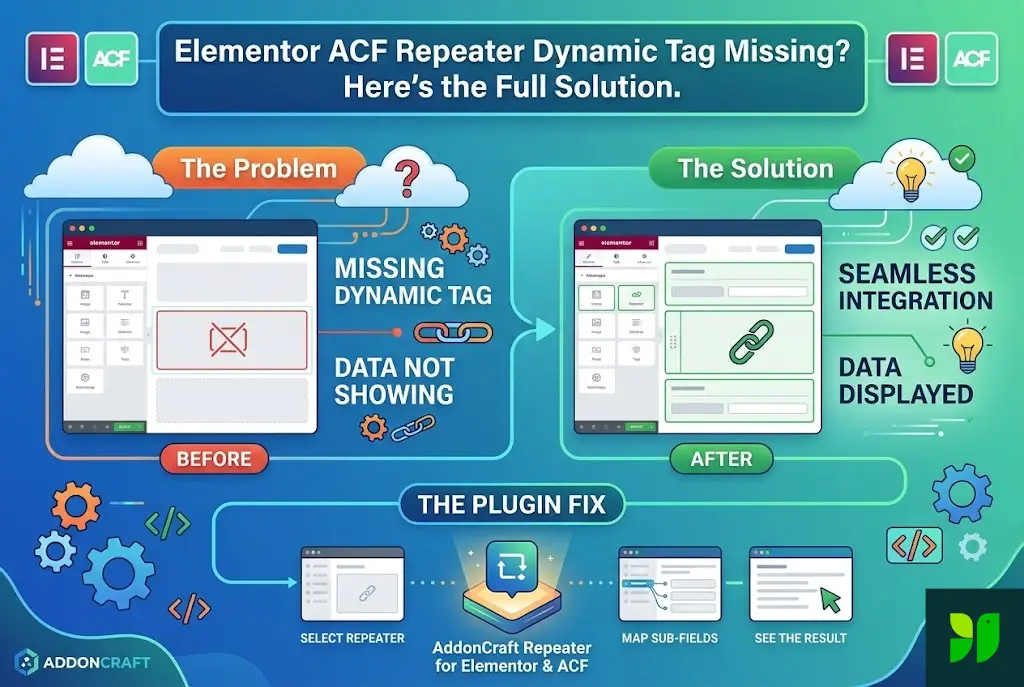
You open Elementor Pro, ready to map that data to your layout using Dynamic Tags, only to find… nothing. The sub-fields within your ACF Repeater are invisible to Elementor’s standard dynamic tags.
It feels like a betrayal. Elementor and ACF are supposed to be the “Power Couple” of WordPress, yet in this specific instance, they aren’t even on speaking terms.
In this exhaustive guide, we’re going to look under the hood of why this happens, why the native Elementor integration falls short, and how the AddonCraft Repeater for Elementor & ACF plugin provides the definitive fix.
The Core Concepts – Why We Use These Tools
Before we dissect the problem, let’s establish a baseline of what these technologies are and why they are indispensable for modern web design.
What are ACF Dynamic Tags?
In the world of Elementor, a Dynamic Tag is a bridge. Normally, when you type text into an Elementor widget, that text is “static”—it lives only inside that widget. If you want to change it, you have to open Elementor and type something else.
Dynamic Tags change the game. They allow you to click the small “database” icon and tell Elementor: “Don’t show the text I type here. Instead, go to the database, find the Custom Field named ‘Price,’ and show whatever value is saved there.” This allows you to create one template that works for 1,000 different products.
The Power of the Elementor Repeater Control
Within Elementor’s internal widgets (like the Icon List, Testimonial Carousel, or Tabs), there is a Repeater Control. This is the user interface that allows you to click a “Add Item” button to generate a new row of content. It’s fantastic for manual entry, but it is traditionally “closed off” from external data sources like ACF.
What is an ACF Repeater?
The ACF Repeater Field is a premium feature of Advanced Custom Fields Pro. It allows you to create a “set” of sub-fields that can be repeated again and again. For example, if you are building a “Speakers” section for a conference website, your repeater might include:
Speaker Name (Text)
Speaker Bio (Textarea)
Speaker Image (Image)
Social Media Link (URL)
The beauty of the ACF Repeater is that for “Post A,” you might have two speakers, while for “Post B,” you might have ten. The database handles this flexibility perfectly.
The Detailed Problem – Why the Dynamic Tag Goes Missing
If both tools are so powerful, why is there a “Missing Dynamic Tag” issue? The problem isn’t a “bug” in the traditional sense; it’s a fundamental architectural mismatch between how Elementor expects data and how ACF stores repeaters.
1. The Array vs. String Conflict
Elementor’s standard Dynamic Tags are built to fetch Strings (single pieces of text) or Integers (numbers). When you ask for a standard ACF Text field, it’s a simple 1-to-1 relationship.
An ACF Repeater, however, is an Array. It’s a box containing other boxes. When Elementor looks at a Repeater field, it doesn’t see “Text”; it sees a complex data structure. Because Elementor doesn’t natively know how to “loop” through that array to pick out specific sub-fields, it simply doesn’t show them in the Dynamic Tags list.
2. The Contextual “Loop” Problem
In PHP development, if you want to display an ACF Repeater, you have to write a while loop:
while( have_rows('my_repeater') ) : the_row();
This “Loop” tells WordPress: “We are now looking inside Row 1… now we are looking inside Row 2.” Elementor widgets are mostly “static observers.” They don’t have an inherent “Loop” function built into their individual settings. When you try to use a Dynamic Tag inside a standard Icon List item, Elementor doesn’t know you want it to look inside the ACF Repeater loop. It looks at the top level of the Post, can’t find the sub-field, and fails.
3. The “Missing Icon” in Nested Widgets
If you go into an Elementor widget that has its own repeater (like the Price Table), and you click on an item to edit it, you will often find that the Dynamic Tag icon is missing entirely for sub-items. Elementor’s developers limited Dynamic Tags in these areas to prevent database errors, but in doing so, they locked out ACF Repeater users.
4. The “Design vs. Data” Bottleneck
Even if you manage to use a shortcode to pull ACF Repeater data, you lose all your styling. You might get a raw list of names, but you can’t make them into a beautiful 3-column grid with hover effects and custom typography using the Elementor interface. You’re stuck between “Good Data” and “Good Design,” unable to have both.
The Ultimate Fix – AddonCraft Repeater for Elementor & ACF
This is where the AddonCraft Repeater for Elementor & ACF comes in.
This plugin acts as the “translator” that speaks both Elementor and ACF Repeater fluently. It was developed specifically to solve the “Missing Tag” crisis by creating a bridge that allows Elementor to understand nested ACF data.
How AddonCraft Solves the Architectural Mismatch
Instead of trying to force a square peg into a round hole, AddonCraft provides a suite of tools that are “Repeater Aware.”
It Initiates the Loop: When you use an AddonCraft widget, it automatically starts the ACF
have_rows()loop in the background.It Exposes Sub-Fields: It makes the “hidden” sub-fields of your ACF Repeater visible to Elementor.
It Connects to Native Widgets: It allows you to use your favorite Elementor layouts but populates them with ACF Repeater data.
Key Features of AddonCraft Repeater
To understand why this is the preferred solution for professional developers, we need to look at the specific features that handle the problems we discussed.
1. Dynamic Content Mapping
The plugin allows you to map specific ACF sub-fields to specific parts of an Elementor widget. For example, if you are using an “Icon List” widget, you can map:
ACF Sub-field “Label” → Elementor Item Text
ACF Sub-field “Icon Selection” → Elementor Item Icon
ACF Sub-field “Link URL” → Elementor Item Link
2. Support for Complex Field Types
One of the biggest issues with ACF Repeaters is handling different types of data. AddonCraft doesn’t just handle text; it handles:
Images: Map an ACF Image sub-field (ID, Array, or URL) to Elementor’s image controls.
Select/Checkbox/Radio: Pull the value or the label from your choices.
URLs and File Downloads: Perfect for creating dynamic resource lists.
3. “The Repeater of Repeaters” (Nested Support)
Sometimes, your data is even more complex. You might have a Repeater inside a Repeater. AddonCraft is built to handle nested hierarchies that would normally require hours of custom PHP coding.
4. Layout Flexibility: Grid, List, and Beyond
One of the most powerful aspects of this plugin is that it doesn’t force you into a single design. Because it integrates with Elementor’s core logic, you can take your ACF Repeater data and display it as:
A vertical list for FAQs.
A horizontal grid for Team Members.
A carousel for Testimonials.
A custom-designed “Skin” that matches your brand perfectly.
Step-by-Step Tutorial – Setting Up Your First Dynamic Repeater
Let’s walk through a real-world scenario: Building a “Property Features” list for a real estate website.
Phase 1: The ACF Setup
Create a new Field Group called “Property Details.”
Add a Repeater Field named
property_features.Inside the repeater, add two sub-fields:
feature_name(Text)feature_icon(Icon Picker or Image)
Assign this field group to your “Properties” Post Type.
Go to a Property post and add 5-6 features (e.g., “Pool,” “Gym,” “24/7 Security”).
Phase 2: The Elementor Setup (The Old Way vs. The AddonCraft Way)
The Old Way (Failing): You drag in an Icon List widget. You try to click the Dynamic Tag on the first item. You search for “ACF Repeater.” It isn’t there. You try to use a shortcode. It looks like a mess. You give up.
The AddonCraft Way (Success):
Install and Activate AddonCraft Repeater for Elementor & ACF.
Open your Property Template in Elementor.
Search for the AddonCraft ACF Repeater widget (or a supported native widget).
In the “Query” settings, select ACF Repeater as the source.
Select
property_featuresfrom the dropdown list.Under the Layout/Items section, click on the sub-field mapping.
Set the Title to use the
feature_namesub-field and the Icon to usefeature_icon.Watch the Magic: All 5-6 features instantly appear in your Elementor editor, styled perfectly.
Why This Matters for Your SEO and Performance
You might be wondering: “Does adding another plugin hurt my SEO or site speed?”
Actually, using a clean solution like AddonCraft can improve your site’s health:
1. Cleaner Codebase
The alternative to this plugin is often a “Frankenstein” of custom PHP, shortcodes, and “display:none” CSS hacks to hide empty fields. AddonCraft generates clean, semantic HTML that search engines love.
2. Reduced Query Load
The plugin is optimized to fetch all repeater data in a single database call rather than pinging the database for every single item. This keeps your “Time to First Byte” (TTFB) low, which is a critical Google ranking factor.
3. Responsive Design
Because you are using Elementor’s native responsive controls through AddonCraft, your dynamic data will be mobile-friendly. Given that Google uses mobile-first indexing, this is non-negotiable for modern SEO.
Real-World Use Cases
How can you use this in your next project? Here are four ideas to get you started:
Use Case 1: Restaurant Menus
Instead of editing a massive Elementor page every time a price changes, use an ACF Repeater for “Dishes.” Your client can update the price and description in a simple WordPress form, and AddonCraft will update the beautiful Elementor menu layout automatically.
Use Case 2: Speaker/Team Grids
For events or corporate sites, use a repeater for Team Members. Use AddonCraft to map their headshots to an Image widget and their LinkedIn URLs to a Button widget. If a team member leaves, just delete that row in ACF.
Use Case 3: Advanced FAQ Sections
Standard FAQ widgets are hard to manage. By using an ACF Repeater, you can allow clients to add unlimited Q&A pairs. AddonCraft can then pull these into an Accordion widget dynamically.
Use Case 4: Software Features / Specs
If you are building a tech review site or an app landing page, use repeaters to list “Technical Specs.” This allows for a consistent look across different product pages while the data remains unique to each post.
Frequently Asked Questions (FAQ)
Q: Do I need Elementor Pro to use AddonCraft Repeater?
A: While AddonCraft works excellently with Elementor Pro (as that’s where most ACF users live), its primary goal is to bridge the gap between ACF and Elementor’s building capabilities.
Q: Does it work with the free version of ACF?
A: The “Repeater” field is a feature of ACF Pro. Since this plugin is designed to handle Repeater data, you will need ACF Pro to create the data source itself.
Q: Can I style each item in the repeater differently?
A: You can set a global style for the repeater (colors, fonts, borders), and the plugin will apply that style to every item it pulls from the database. This ensures a professional, consistent look.
Q: Is there a limit to how many items it can pull?
A: No. Whether you have 2 items or 200 in your ACF Repeater, the plugin will loop through all of them and display them based on your settings.
Conclusion: Stop Fighting Your Tools
As a developer, your time is your most valuable asset. Spending hours trying to find a workaround for a missing Dynamic Tag is not a good use of that asset.
The “Missing Dynamic Tag” issue in Elementor isn’t a sign that you should stop using ACF Repeaters. It’s simply a sign that you need a bridge. AddonCraft Repeater for Elementor & ACF is that bridge. It restores the functionality you expected to have from the start, allowing you to build complex, data-driven websites with the visual ease of Elementor.
Don’t let your data stay hidden. ### Next Step:
Would you like me to walk you through the specific CSS settings in AddonCraft to make your dynamic grid look perfect on mobile devices?