The digital landscape of 2026 is vastly different from even a few years ago. We’ve moved past the era of “clunky” builders and entered the age of AI-assisted Site Synthesis. If you’re looking to build a website today, you aren’t just looking for a digital brochure; you’re building an ecosystem.
WordPress remains the gold standard because it has adapted. It is no longer just a blogging platform; it is a “Full Site Editing” (FSE) powerhouse that allows beginners to achieve professional results that used to cost $10,000 in agency fees.
In this guide, we will break down every single step of the process. No jargon, no gatekeeping—just a clear path to your new website.
Table of Contents
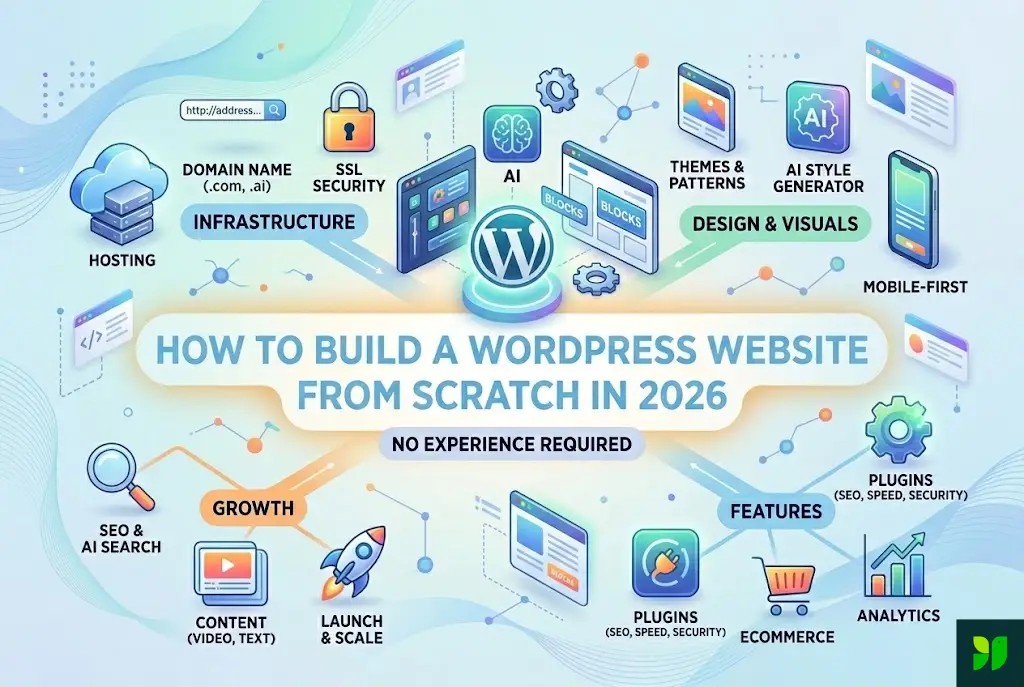
The Strategy: Defining Your Goal
The Infrastructure: Domain, Hosting, and SSL
The Core: Installing WordPress and the 2026 Dashboard
The Visuals: Choosing Block Themes and AI Design Tools
The Architecture: Creating Pages and Navigation
The Muscle: Essential Plugins for 2026
The Visibility: SEO and AI Search Optimization
The Launch: Testing and Security
1. The Strategy: Defining Your Goal
Before you click a single button, you must define the “Why.” A common mistake beginners make is starting with design. In 2026, User Intent is the only thing that matters to search engines.
Is it a Portfolio? Focus on high-resolution image blocks and fast-loading galleries.
Is it an E-commerce site? You’ll need WooCommerce integration from the start.
Is it a Blog/Authority site? Focus on readability, typography, and “Content Clusters.”
Action Step: Write down the three things you want a visitor to do within 10 seconds of landing on your site. (e.g., Sign up for a newsletter, book a consultation, or read your latest post).
2. The Infrastructure: Domain, Hosting, and SSL
In 2026, the technical requirements for “speed” are stricter than ever. Google’s algorithms now penalize any site that takes longer than 1.2 seconds to become interactive. This starts with your host.
Choosing a Domain
Your domain name is your brand. Avoid “clever” spellings. If you have to spell your website name out loud to someone, it’s a bad domain.
Extension: .com is still the king for trust, but .ai or .io are perfectly acceptable for tech niches.
Privacy: Ensure your registrar includes WHOIS Privacy for free. In 2026, data privacy is a legal necessity in many regions.
Selecting a 2026-Ready Host
Don’t fall for “Unlimited Everything” plans for $1.99. Those servers are overcrowded. Look for:
NVMe Storage: Much faster than standard SSDs.
Edge Caching: This mirrors your site on servers across the globe so it’s fast for someone in London and Tokyo.
Auto-Managed Updates: You want a host that automatically patches security holes.
3. The Core: Installing WordPress
Most premium hosts now offer a “Managed WordPress” experience. This means when you buy your hosting, WordPress is already installed.
The 2026 Dashboard
When you first log in to yourdomain.com/wp-admin, you’ll notice the “Welcome” screen. In 2026, WordPress features a built-in Setup Wizard.
Site Identity: Upload your logo (SVG format is best for 2026 for crispness on 8K screens).
Tagline: Make this your “Value Proposition.” (e.g., “Eco-friendly landscaping for modern homes.”)
Permalinks: Go to Settings > Permalinks and ensure it is set to “Post Name.” This is crucial for SEO.
4. The Visuals: Choosing Block Themes and AI Design
The “Theme Forest” era of buying massive, heavy themes is over. In 2026, we use Block Themes. These are lightweight frameworks that allow you to edit the header, footer, and everything in between using the Gutenberg editor.
Recommended Themes:
Twenty Twenty-Six: The default WordPress theme is now incredibly sophisticated and perfect for minimalist sites.
GeneratePress (Block Version): Known for being the fastest theme on the market.
Frost: A beautiful, designer-ready block theme.
The Power of AI Patterns
Inside the editor, you will see a tool called Patterns. Instead of building a “Contact Me” section from scratch:
Click the plus (+) sign.
Search “Contact.”
Choose a pre-designed pattern.
In 2026, you can use the AI Style Generator to instantly swap the colors of that pattern to match your brand.
5. The Architecture: Creating Pages and Navigation
A website is only as good as its navigation. If a user gets lost, they leave.
The Essential Pages:
Home: Your “Elevator Pitch.”
About: Focus on how you solve the reader’s problem, not just your bio.
Services/Products: Clear, concise lists with “Call to Action” (CTA) buttons.
Contact: A simple form (use WPForms or Fluent Forms).
Privacy Policy: Legally required in 2026. Use a generator to ensure you’re GDPR and CCPA compliant.
Designing the Menu
Go to Appearance > Editor > Navigation. Keep your menu to 5 items or fewer. Use “Drop-downs” only if you have a massive amount of content.
6. The Muscle: Essential Plugins for 2026
Plugins give your site superpowers. However, every plugin adds a tiny bit of “weight” to your site. Stick to these essentials:
SEO: Rank Math or Yoast
In 2026, these plugins don’t just check for keywords; they check for Semantic Richness. They will tell you if your writing is too robotic or if you’ve missed key topics that “AI Search” (like Google SGE) is looking for.
Speed: WP Rocket or FlyingPress
Even with a good host, you need “Caching.” This creates a static version of your site so the server doesn’t have to “think” every time someone visits.
Security: Two-Factor Authentication (2FA)
In 2026, hackers use AI to guess passwords in milliseconds. You must use 2FA. Plugins like Solid Security make this easy.
7. The Visibility: SEO and AI Search Optimization
SEO has evolved. In 2026, Google cares about EEAT: Experience, Expertise, Authoritativeness, and Trustworthiness.
How to Rank in 2026:
Zero-Click Content: Write summaries at the top of your posts. AI search engines love to “scrape” these, and it increases your chances of being the “Featured Snippet.”
Video Integration: In 2026, every blog post should have a 30-second video summary. Use an AI video tool to generate this if you’re camera-shy.
Internal Linking: Use a tool like Link Whisper to connect your posts. This tells Google which pages are your most important.
Voice Search Optimization: People ask questions like “How do I build a website?” rather than typing “WordPress tutorial.” Use natural, conversational headers (H2 and H3 tags).
8. The Launch: Testing and Security
Before you share your link on social media, perform the “Grand Opening” Audit.
The Mobile Test: Open your site on an iPhone and an Android. Are the buttons big enough? Does the text overlap?
The Speed Test: Run your URL through Google PageSpeed Insights. You want a score of 90+.
Broken Links: Use a “Link Checker” to make sure your buttons actually go where they’re supposed to.
The “Grandma” Test: Ask someone who isn’t tech-savvy to find your contact page. If they can’t do it in 30 seconds, your navigation is too complex.
Conclusion: Your Site is a Journey, Not a Destination
Building a WordPress website in 2026 is an empowering experience. You are no longer at the mercy of expensive developers or restrictive “drag-and-drop” builders that own your data. You have the keys to the kingdom.
The most important thing you can do now is Start. Don’t wait for the perfect logo or the perfect 2,000-word “About Me” page. Launch with a “Minimum Viable Product” (MVP) and iterate.
WordPress is designed to grow with you. As your business or hobby expands, your website can evolve from a single page into a global platform.