In the fast-moving world of WordPress development, standing still is the same as moving backward. With over 2 million active installations, Essential Addons for Elementor (EA) has long been the undisputed heavyweight champion of the Elementor ecosystem. It’s the first plugin most developers install after Elementor itself.
However, the release of Essential Addons 6.0 marks a significant turning point. This isn’t just a “version update”—it is a reimagining of what a widget library should be. In an era where site speed and user experience (UX) are the primary drivers of SEO and conversion, EA 6.0 moves away from just “more widgets” and toward “smarter tools.”
In this 2,000-word deep dive, we will break down the flagship features of version 6.0, explore the new interactive extensions, and explain how these upgrades help you build high-performance websites that look like they cost $10,000 to develop.
The Philosophy of 6.0: Performance First, Design Always
Before we look at specific widgets, we must understand the “why” behind this update. The web in 2026 is obsessed with Core Web Vitals. Google no longer tolerates “bloated” plugins.
The developers at WPDeveloper spent months refactoring the codebase for 6.0. The result is a plugin that is significantly faster than its predecessor.
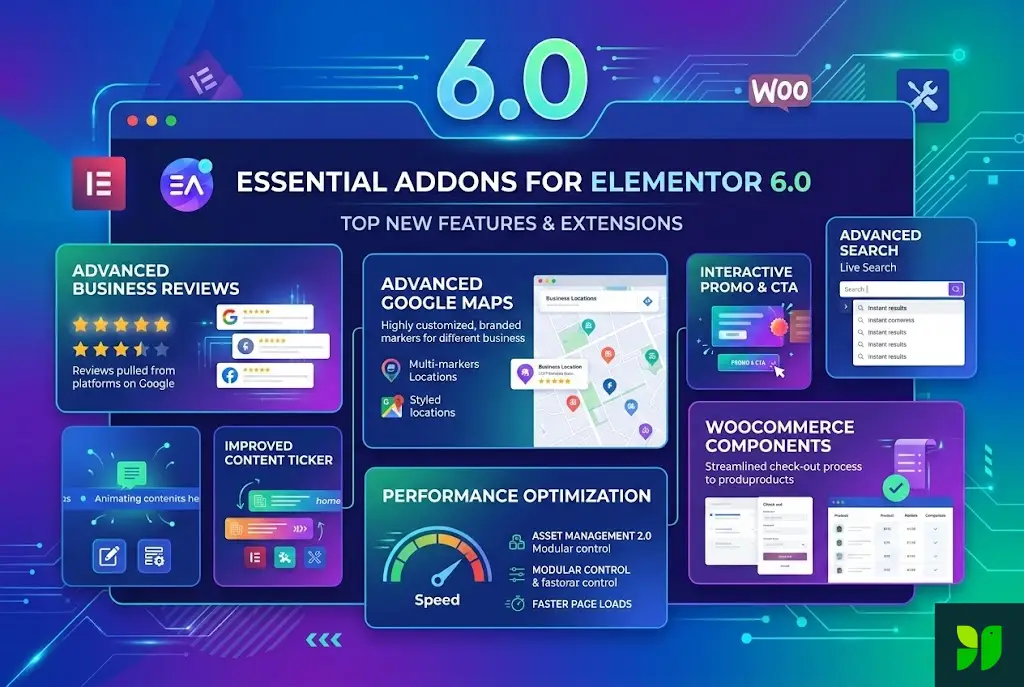
Asset Manager 2.0: The plugin now uses a more aggressive modular loading system. If you aren’t using the “Creative Buttons” widget, the CSS and JavaScript for those buttons are never even requested by the browser.
Clean Markup: Every widget has been audited to ensure it produces the least amount of HTML possible. This reduces “DOM depth,” a common issue that slows down mobile browsing.
A Reimagined User Experience (The New Dashboard)
The first thing you’ll notice after updating is the all-new Dashboard. If you’ve used EA in the past, you know that managing nearly 100 widgets could be overwhelming.
The Centralized Control Center
The 6.0 dashboard introduces a sleek, modern UI that feels integrated into the WordPress experience.
One-Click Toggles: Instantly enable or disable entire categories of widgets (Content, Dynamic, Social, etc.).
Integrated Support: You can now access documentation and support tickets directly from your WordPress backend.
The “Elements” Search: Instead of scrolling through an endless list, a new instant-search feature allows you to find and toggle specific widgets in seconds.
Flagship Extension: Hover Interactions
This is the “crown jewel” of the 6.0 update. In the past, creating complex hover effects required either custom CSS or a dedicated interaction plugin. Hover Interactions brings this power directly into the Elementor panel.
What Makes It Special?
Most widgets only allow you to change a background color or text color on hover. The Hover Interactions extension allows you to trigger sequences.
The “Reveal” Effect: You can design a card that looks like a simple image, but upon hovering, the image blurs, a title slides in from the top, and a “Buy Now” button fades in from the bottom.
Cursor-Follower Animations: You can create elements that subtly “lean” toward or move away from the mouse cursor, creating a 3D feel.
Interactive Masks: You can use a shape (like a circle or a star) as a “flashlight” that reveals a different image or color as the user moves their mouse over a section.
Interactive Animations: Adding Motion with Meaning
Static websites feel dated. Motion design is the key to holding a user’s attention. EA 6.0 introduces a robust Interactive Animations extension that goes far beyond the “Fade In” or “Bounce” effects native to Elementor.
The Three Pillars of EA Motion:
Entrance Sequences: These allow you to “stack” animations. For example, a heading can fade in while simultaneously scaling up from 0.8x to 1x.
Scroll-Triggered Motion: As the user scrolls down the page, you can tie the rotation or opacity of an element to the scroll percentage. This is the foundation of modern “scrollytelling.”
Continuous/Floating Animations: Perfect for “floating” icons or subtle background movements that keep the page from feeling “dead.”
Dynamic Tags & Content Personalization
In marketing, Personalization = Conversion. The new Dynamic Tags extension in EA 6.0 is designed to help you create “Smart Landing Pages.”
Pulling Data from Everywhere
Dynamic Tags allow you to pull information from the WordPress database and inject it into your widgets automatically.
User Info: Display the logged-in user’s name or avatar in a header.
Query Parameters: If you are running an ad campaign, you can pull a “Discount Code” from the URL and display it on the page dynamically.
Advanced Custom Fields (ACF) Integration: This is where EA 6.0 truly shines. It allows for seamless mapping of ACF data into widgets like the Post Grid or Call to Action, ensuring that your dynamic templates are always populated with the right content.
The “Liquid Glass” & “Particles” Extensions
Version 6.0 brings high-end aesthetic trends directly to the masses.
Liquid Glass: Based on the “Glassmorphism” design trend, this extension allows you to create frosted-glass effects with a single click. You can control the blur intensity, border-radius, and transparency to create stunning overlays.
Particles: Adding a particle background used to require a separate JavaScript library. Now, you can add floating stars, snow, or geometric connections to any Elementor section background directly through EA’s settings.
Deep Dive: The WooCommerce Widget Overhaul
For e-commerce owners, EA 6.0 is a mandatory update. The WooCommerce widgets (Product Grid, Woo Checkout, Woo Collections) have been rebuilt for better conversion optimization.
Key Improvements:
Direct “Quick View”: Allow customers to view product details in a modal without leaving the shop page, reducing friction in the buying journey.
Custom Sales Badges: Create unique, eye-catching “Sale” or “New” badges that match your brand’s typography and color scheme.
Enhanced Cart Interactivity: The side-cart and mini-cart widgets now feature smoother Ajax updates, meaning the page doesn’t refresh when an item is added, keeping the shopping flow uninterrupted.
Conditional Display Logic: The “If/Then” of Web Design
Not every visitor needs to see every part of your website. The Conditional Display extension has been upgraded in 6.0 to be more intuitive.
Strategic Scenarios:
The “Returning Visitor” Offer: Show a “Welcome Back” discount to users who have visited before, while showing a “Sign Up” form to new users.
Role-Based Content: Hide wholesale pricing from retail customers and only show it to users with a specific “Wholesaler” role.
Schedule-Based Banners: If you run a Friday-only flash sale, you can set the banner to appear automatically at 12:01 AM Friday and disappear at 11:59 PM, saving you from manual midnight updates.
Performance Comparison: EA 6.0 vs. Others
Many developers worry about “Plugin Soup”—the slowing down of a site due to too many addons. Here is how EA 6.0 stacks up:
| Metric | Elementor Native | EA 6.0 | Competitor Addons |
| JS File Size | Baseline | +24kb (Optimized) | +85kb+ |
| CSS Impact | Baseline | Minimal (Modular) | Significant (Bulk Load) |
| Feature Richness | Basic | Advanced | Moderate |
By using Selective Asset Loading, EA 6.0 ensures that your Google PageSpeed Insights score remains in the green, even if you have 20 different widgets active on your site.
Tutorial: How to Build a Modern “Reveal” Hero Section with EA 6.0
Let’s put these features into practice. Follow these steps to create a high-converting hero section.
Set Up the Container: Use the Elementor Flexbox Container and set a background image.
Add EA Interactive Animations: Drag in an “EA Fancy Text” widget for your headline. Go to the “Advanced” tab, select EA Interactive Animations, and set it to “Scale Up” on page load.
Implement Hover Interactions: Add an “EA Creative Button.” In the Hover Interactions extension, set the button to “Grow” and change the box-shadow to a vibrant neon glow.
Add Liquid Glass: To make your text readable over a busy background, place your text inside a sub-container and apply the EA Liquid Glass extension to that container. Set the blur to 10px.
Final Polish: Enable EA Particles in the section background to add subtle moving “bubbles” that give the page a sense of depth.
SEO Benefits of Essential Addons 6.0
You might wonder how a design plugin helps with SEO. Beyond speed, EA 6.0 helps in several key areas:
Schema Markup: Many EA widgets (like the Post Grid and Testimonials) automatically generate JSON-LD schema. This helps Google understand that your content is a review or a list of articles, potentially leading to “Rich Snippets” in search results.
Image Optimization: EA 6.0 integrates better with lazy-loading protocols, ensuring that your dynamic image galleries don’t block the “Largest Contentful Paint” (LCP).
Engagement Metrics: By using Hover Interactions and Interactive Animations, you increase the “Dwell Time” (how long a user stays on your page). Search engines interpret longer dwell times as a sign of high-quality content.
Frequently Asked Questions (FAQ)
Q: Is Essential Addons 6.0 free?
A: There is a very generous Free version on WordPress.org that includes over 40 widgets. However, the advanced extensions like Hover Interactions, Conditional Display, and Liquid Glass are part of the Pro version.
Q: Will updating to 6.0 break my existing site?
A: The team has ensured “Backwards Compatibility.” However, as with any major update (from 5.x to 6.x), we always recommend taking a backup and testing the update on a staging site first.
Q: How do I keep my site fast with 95+ widgets?
A: Use the EA Element Control panel to disable every widget you are not using. This prevents the plugin from loading unnecessary code.
Conclusion: The New Standard for Elementor
Essential Addons for Elementor 6.0 is not just a collection of widgets; it is a professional design framework. It bridges the gap between the “standard” look of a WordPress site and the bespoke, high-end feel of a custom-coded masterpiece.
By focusing on Interactivity (Hover & Motion), Efficiency (Modular Loading), and Intelligence (Conditional Logic), EA 6.0 has solidified its position as the must-have tool for any serious WordPress creator.
If you haven’t updated yet, now is the time to embrace the future of visual building. Your clients—and your visitors—will notice the difference.